




Know exactly where your AI tokens go.
Cross-agent token usage and cost auditing for Claude Code, Codex CLI, and Gemini CLI. Use it from the command line, or let your AI agent query it directly via MCP. 100% local, no cloud required.
pipx install token-auditAlternative: pip or uv
pip install token-audit
# or
uv pip install token-audit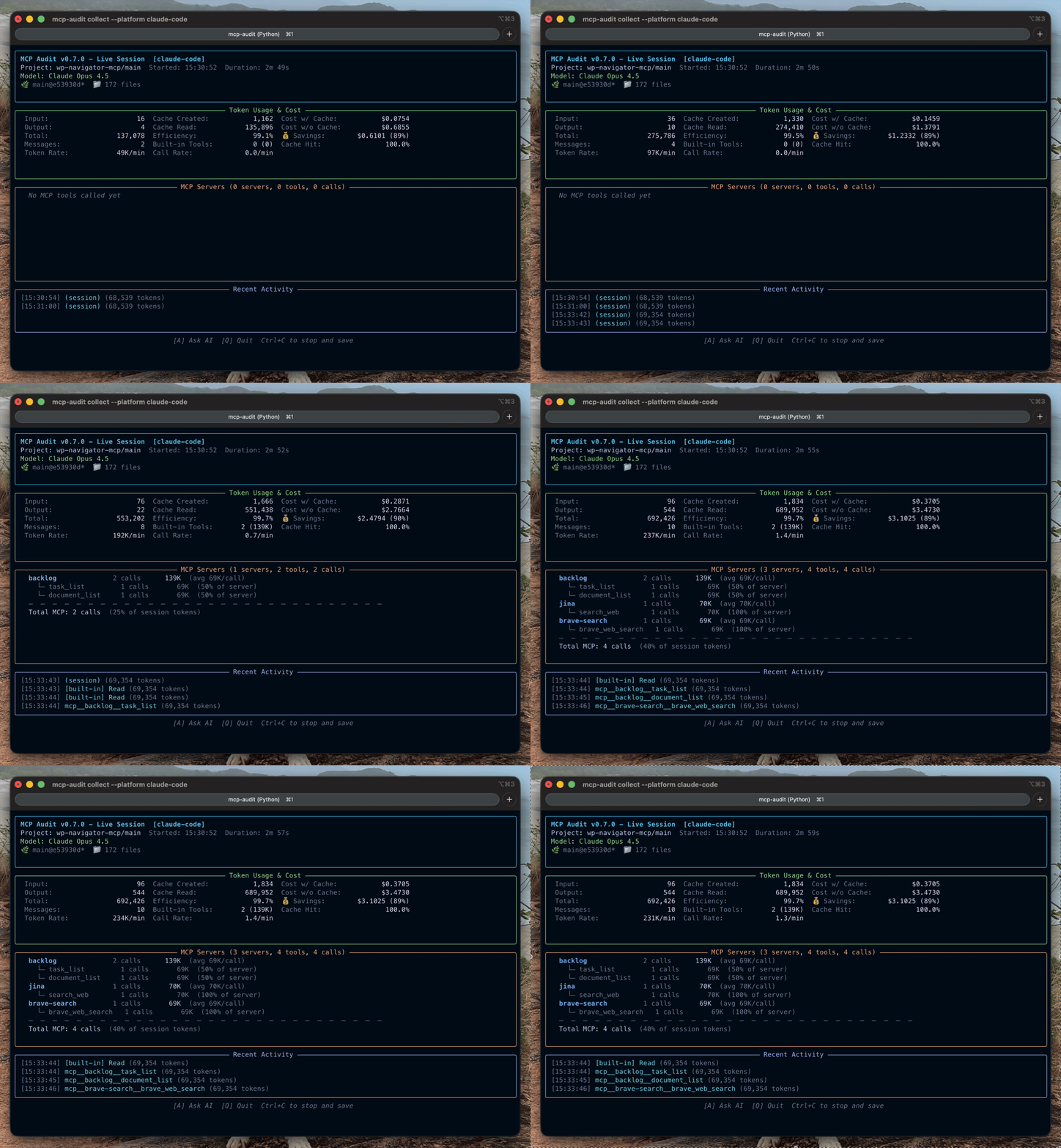
Bug Fixes — 7 stability improvements for CLI commands:
- Task markers persist correctly — Fixed critical data loss where markers were overwritten (#119)
- Sessions list reliability —
--jsonand--verbosenow show all sessions (#120, #124) - Platform name handling — Hyphenated names (e.g.,
claude-code) work correctly (#121) - Collect command robustness — No more
FileNotFoundErrorwithout project dir (#122) - Validate command fixed — Schema path resolution works in all install modes (#123)
See v1.0.5 for task command targeting fix, v1.0.4 for Bucket Classification.
- MCP developers — See which tools are expensive, find schema bloat, track unused tools
- Power users — Know why sessions auto-compact early, find what's eating tokens
- Cost-conscious teams — Track spend across Claude/Codex/Gemini, compare model costs
# Start tracking (auto-detects platform)
token-audit collect
# → Live TUI showing token burn rate, cache ratio, costs

# Browse past sessions with interactive dashboard
token-audit ui
# → Navigate sessions, view recommendations, export for AI analysis

# See daily usage summary
token-audit daily
# → Token counts, costs, and trends by project
That's it. Token Audit reads your local session logs and shows you exactly where your tokens go.
💡 Gemini CLI users: Improve token accuracy
[!TIP] Run
token-audit tokenizer downloadfor 100% accurate per-tool token counts. Without this, Token Audit uses a ~95% accurate fallback estimator.
Want your AI agent to query usage directly? See MCP Server Mode.
Jump to: What It Tracks · Platform Support · MCP Server Mode · CLI Reference · Roadmap
| Category | What's Tracked |
|---|---|
| Session totals | Input, output, cache read/write tokens, and costs |
| Historical usage | Daily, weekly, monthly aggregation with project grouping and per-model breakdown |
| Built-in tools | Read, Write, Bash, Edit, Grep (counts vary by platform) |
| MCP tools | Any MCP server tool, with per-tool token attribution |
| MCP servers | Schema overhead ("context tax") per server |



| Platform | Session Accuracy | Per-Tool Accuracy | Guide |
|---|---|---|---|
| Claude Code | Native (100%) | Native | → |
| Codex CLI | Native (99%+) | Estimated¹ | → |
| Gemini CLI | Native (100%) | Estimated² | → |
¹ tiktoken o200k_base ² Gemma tokenizer (optional download for 100% accuracy)
Detailed Capability Matrix
| Capability | Claude Code | Codex CLI | Gemini CLI |
|---|---|---|---|
| Session tokens | Native | Native | Native |
| Per-tool tokens | Native | Estimated | Estimated |
| Reasoning tokens | Not exposed | o-series | Gemini 2.0+ |
| Cache tracking | Create + Read | Read only | Read only |
| Cost estimates | Accurate | Accurate | Accurate |
Gemini CLI users: Run token-audit tokenizer download for 100% accurate token counts (otherwise ~95% via fallback).
- Live TUI dashboard — Token burn rate, cache hit ratio, cost efficiency
- Per-server breakdown — Which MCP servers consume the most tokens
- Per-tool attribution — Drill down to individual tool calls
Token Audit detects "smells" — patterns that signal inefficiency, not errors. These are opportunities to optimize, not problems to fix immediately.
- 4-bucket classification — Diagnose WHERE tokens go: state serialization (large payloads), redundant outputs (duplicate calls), tool discovery (schema introspection), or conversation drift (reasoning/retries). See Bucket Classification Guide.
- 12 efficiency smells — HIGH_VARIANCE, CHATTY, REDUNDANT_CALLS, BURST_PATTERN, and more. For example, CHATTY flags tools that send many small payloads instead of batching, and REDUNDANT_CALLS highlights repeated identical calls that could be cached — both common causes of early compaction.
- Zombie tool detection — Find MCP tools defined but never called (wasting schema tokens)
- Context tax analysis — See how much schema overhead each MCP server adds per turn
- Historical aggregation —
token-audit daily,weekly,monthlywith project grouping - AI export —
token-audit report --format aifor analysis with your preferred AI - Best practices —
token-audit best-practicesexports 10 curated MCP efficiency patterns
Token Audit is actively developed — see the roadmap for burn-rate tracking, billing blocks, and deeper MCP profiling.
Run token-audit as an MCP server your AI assistant connects to directly — get efficiency insights without switching terminals.
# Install with server support
pipx install 'token-audit[server]'
Claude Code
Add to .mcp.json in your project or ~/.claude/.mcp.json globally:
{
  "mcpServers": {
    "token-audit": {
      "command": "token-audit-server",
      "args": []
    }
  }
}
See Claude Code setup guide for details.
Codex CLI
Add to ~/.codex/config.toml (path may vary by installation):
[mcp_servers.token-audit]
command = "token-audit-server"
args = []
See Codex CLI setup guide for details.
Gemini CLI
Add to ~/.gemini/settings.json (path may vary by installation):
{
  "mcpServers": {
    "token-audit": {
      "command": "token-audit-server",
      "args": []
    }
  }
}
[!TIP] Run
token-audit tokenizer downloadfor 100% accurate per-tool token counts.
See Gemini CLI setup guide for details.
After restarting your AI CLI, ask:
- "Get current token usage metrics"
- "Show breakdown by tool"
| Tool | Purpose |
|---|---|
start_tracking |
Begin live session monitoring |
get_metrics |
Query current token usage, costs, cache stats |
get_recommendations |
Get optimization suggestions |
analyze_session |
Comprehensive end-of-session analysis |
get_best_practices |
Retrieve MCP efficiency patterns |
analyze_config |
Analyze MCP config for issues |
get_pinned_servers |
Get frequently-used MCP servers |
get_trends |
Cross-session pattern analysis (7/30/90 days) |
get_daily_summary |
Daily token/cost aggregation with trends |
get_weekly_summary |
Weekly usage aggregation |
get_monthly_summary |
Monthly usage aggregation |
list_sessions |
Query historical sessions with filtering |
get_session_details |
Retrieve full session data |
pin_server |
Add/remove pinned MCP servers |
delete_session |
Remove session from storage |
Tool names and outputs are stable in v1.x. New tools may be added without breaking changes.
MCP resources provide read-only access to usage data via the resource protocol:
| Resource URI | Description |
|---|---|
token-audit://usage/daily |
Daily usage summary (last 7 days) |
token-audit://usage/weekly |
Weekly usage summary (last 4 weeks) |
token-audit://usage/monthly |
Monthly usage summary (last 3 months) |
token-audit://sessions |
List of recent sessions |
token-audit://sessions/{id} |
Detailed session information |
Ask your AI: "How many tokens have I used? Show me the breakdown by tool."
See MCP Server Guide for full documentation.
Token Audit is a passive observer. It reads local session logs — nothing more.
| Guarantee | Details |
|---|---|
| No proxies | Zero interception, zero latency impact |
| 100% local | All data stays on your machine |
| No accounts | Works offline, no cloud sync |
| No telemetry | No usage data sent anywhere |
| Optional pricing API | LiteLLM pricing fetch can be disabled |
Only token counts and tool names are logged — prompts and responses are never stored.
"Why does my agent auto-compact so quickly?" → Token Audit shows which MCP tools and schemas push sessions over the context threshold.
"Which MCP tools are expensive?" → The TUI highlights per-tool token usage and flags chatty, high-variance, or burst-pattern tools.
"What's the 'context tax' of my MCP servers?"
→ Schema weight analysis shows the token cost of list_tools before any work happens.
"How do I reduce costs in multi-step workflows?" → Use post-session reports to find redundant calls, large payloads, and zombie tools.
The token-audit ui command opens an interactive browser with seven views:
| View | Key | Description |
|---|---|---|
| Dashboard | 1 |
Today's summary, weekly trends, top smells, recent sessions |
| Sessions | 2 |
Full session list with filtering, search, and delete |
| Recommendations | 3 |
Actionable optimization suggestions by confidence |
| Live | 4 |
Real-time session monitoring with burn rate |
| Analytics | 5 |
Usage trends by period (daily/weekly/monthly), project grouping |
| Smell Trends | 6 |
Pattern frequency over time with severity indicators |
| Pinned Servers | 7 |
Frequently-used MCP servers with usage stats |
Hotkeys: j/k navigate, Enter select, : command palette, / search, d date filter, e CSV, x JSON, a AI export, q quit.
Modals: Press Delete to confirm session deletion, use number keys for quick preset selection in date filter modal.
token-audit collect    # Live tracking (auto-detects platform)
token-audit ui         # Interactive dashboard
token-audit bucket     # Analyze token distribution by bucket (v1.0.4)
token-audit daily      # Usage summary
token-audit report     # Generate report (markdown/json/csv/ai)
token-audit --help     # Full command list
All Commands
token-audit collect              # Real-time tracking (auto-detects platform)
token-audit ui                   # Interactive session browser
token-audit report PATH          # Generate report (markdown/json/csv/ai)
token-audit daily                # Daily usage summary
token-audit weekly               # Weekly usage summary
token-audit monthly # Monthly usage summarytoken-audit bucket # Analyze token distribution by bucket
token-audit bucket --by-task # Per-task bucket breakdown
token-audit bucket --format json # JSON output for programmatic use
token-audit task start "Task name" # Start tracking a logical task
token-audit task end # End current task
token-audit task list # List completed tasks with breakdown
token-audit task show "Task name" # Detailed view of specific tasktoken-audit report PATH --smells # Smell analysis mode
token-audit report PATH --format ai # AI-ready export
token-audit best-practices # Export efficiency patterns
token-audit validate session.json # Validate session filetoken-audit export csv # Export sessions as CSV
token-audit export json # Export sessions as JSON
token-audit export ai # Generate AI analysis prompt
token-audit export ai --pinned-focus # Include pinned server analysistoken-audit sessions list # List recent sessions
token-audit sessions show SESSION_ID # View session details
token-audit sessions delete --older-than 30d # Clean up old sessionstoken-audit tokenizer setup # Interactive tokenizer setup
token-audit tokenizer download # Download Gemma tokenizer
token-audit pin SERVER # Pin server for focused analysisCommand Options
--platform          Platform: claude-code, codex-cli, gemini-cli, auto
--theme NAME        Color theme: auto, dark, light, mocha, latte, hc-dark, hc-light
--pin-server NAME   Pin server(s) at top of MCP section
--from-start        Include existing session data (Codex/Gemini only)
--quiet             Suppress display output (logs only)
--plain             Plain text output (for CI/logs)
--format            Output: json, csv, markdown, ai (default: markdown)
--aggregate         Aggregate across multiple sessions
--top-n INT         Number of top tools to show (default: 10)
--smells            Enable smell analysis mode
--pinned-focus      Add dedicated section for pinned servers (with --format ai)
--platform NAME     Filter: claude-code, codex-cli, gemini-cli
--days/weeks/months Number of periods to show
--json              Output as JSON
--instances         Group by project/instance
--breakdown         Show per-model breakdown
⚙️ Configuration
Token Audit fetches current pricing from LiteLLM API (2,000+ models, cached 24h).
To disable and use static pricing only:
# token-audit.toml
[pricing.api]
enabled = falseConfigure known tools to detect unused ("zombie") tools:
# token-audit.toml
[zombie_tools.zen]
tools = ["mcp__zen__thinkdeep", "mcp__zen__debug", "mcp__zen__refactor"]token-audit collect --theme mocha # Catppuccin Mocha (dark)
token-audit collect --theme latte # Catppuccin Latte (light)
token-audit collect --theme hc-dark # High contrast (WCAG AAA)All data stays local:
| Data | Location |
|---|---|
| Sessions | ~/.token-audit/sessions/ |
| Config | ./token-audit.toml or ~/.token-audit/token-audit.toml |
| Pricing cache | ~/.token-audit/pricing-cache.json |
| Fallback pricing | ~/.token-audit/fallback-pricing.json |
| Category | Links |
|---|---|
| Getting Started | Guide |
| Platform Guides | Claude Code · Codex CLI · Gemini CLI |
| Reference | MCP Server · Features · Configuration · API |
| Help | Troubleshooting · FAQ |
| Examples | Debugging Slow Sessions · All Examples |
| Technical | Architecture · Data Contract · Changelog |
Token Audit focuses on real-time tool profiling. Where billing tools answer how much, Token Audit answers why. It complements other tools:
| Tool | Best For | Question Answered |
|---|---|---|
| Token Audit | Deep profiling | "Which specific tool is eating my tokens?" |
| ccusage | Billing history | "How much did I spend last month?" |
| Claude Code Usage Monitor | Session limits | "Will I hit my limit this hour?" |
Current: v1.0.6 — 7 bug fixes for CLI stability (sessions list, task markers, validate, collect)
Upcoming:
- v1.1.0 — Billing & Statusline: 5-hour billing block tracking, Claude Code statusline hook
- v1.2.0 — Burn Rate: Cost projections, progress bars toward limits
- v1.3.0 — MCP Profiler: Schema waste metrics, tool coverage analysis, spike detection
See ROADMAP.md for full details. Share ideas →
We welcome contributions! See CONTRIBUTING.md for guidelines.
- Bug reports: Open an Issue
- Feature ideas: Start a Discussion
- Questions: Ask in Discussions
git clone https://github.com/littlebearapps/token-audit.git
cd token-audit
pip install -e ".[dev]"
pytest
MIT License — see LICENSE for details.
Third-Party:
- tiktoken (MIT) — Codex CLI token estimation
- Gemma tokenizer (Apache 2.0) — Optional, see license terms
Made with 🐻 by Little Bear Apps